
The Meshtastic client for your browser
Talk to your Meshtastic radio over Bluetooth, USB serial or Wi-Fi, with nothing to install
Open the client • Meshtastic docs • How it works • Contributing



Meshtastic Web is the official Meshtastic client for the browser, hosted at client.meshtastic.org. It connects to a radio over the device's HTTP API, Web Serial or Web Bluetooth (Web Serial and Web Bluetooth need a Chromium-based browser). The device-side code lives in the firmware repository.
It speaks to radios through the same Kotlin Multiplatform meshtastic-sdk as the Android, iOS and Desktop apps, compiled to JavaScript. Connection handling, the node database and the protocol behave the same way across every Meshtastic app.
If you have questions or feedback, join the discussion forum or Discord.
- Messaging: channel and direct messages, with unread counts per conversation.
- Map: node positions and waypoints.
- Nodes: node list with signal, hops, telemetry and device details.
- Radio configuration: device, LoRa, channel, security and module settings, plus config backup and restore.
- Connections: save several radios and switch between them; the SDK reconnects automatically.
- Offline-friendly: the node database, config and channels are kept in browser storage between sessions.
- Translations: the UI is translated by the community on Crowdin.
The web client never speaks the Meshtastic protocol itself. Everything between the UI and the radio runs inside the Kotlin SDK:
┌──────────────────────────────────────────────────────────────┐
│ apps/web                React UI                              │
│   src/core/kmp          sessions, chat, nodes, config editor  │
└───────────────┬──────────────────────────────────────────────┘
                │  plain JS objects, Promises, Uint8Array protobufs
┌───────────────▼──────────────────────────────────────────────┐
│ packages/sdk-kmp        @meshtastic/sdk-kmp  (Kotlin/JS)      │
│   @JsExport facade      createHttpClient / createSerialClient │
│                         / createBluetoothClient, admin, sends │
│   browser transports    HTTP API, Web Serial, Web Bluetooth   │
│   browser storage       SQLDelight on SQLite in a worker      │
├──────────────────────────────────────────────────────────────┤
│ vendor/meshtastic-sdk   meshtastic-sdk `core` (Kotlin)        │
│                         handshake, node DB, ACKs, retries,    │
│                         channel decryption, reconnect         │
└───────────────┬──────────────────────────────────────────────┘
                ▼
            Meshtastic radio
- One SDK, every platform. meshtastic-sdk is a Kotlin Multiplatform library. Android, iOS and Desktop compile it for their own platforms; its
coremodule also has a Kotlin/JS target, which is what the web client uses. A protocol fix in the SDK reaches every app. - Compiled to JavaScript at build time.
packages/sdk-kmpis a small Gradle project. The Kotlin/JS compiler builds the SDK together with a thin facade and writes an ES module with TypeScript declarations (dist/sdk-kmp.mjsanddist/sdk-kmp.d.mts). Vite imports it like any other package. The SDK isn't on Maven Central with JS artifacts yet, so it compiles from source out of thepackages/sdk-kmp/vendor/meshtastic-sdkgit submodule. - A narrow boundary. Only plain objects, Promises,
Uint8Arrays and unsubscribe functions cross into TypeScript. Protobuf messages cross as bytes and are decoded on the TypeScript side with@meshtastic/protobufs, so both sides agree on the wire types. - The browser supplies transports and storage. The SDK leaves I/O to its host.
sdk-kmpprovidesRadioTransportimplementations for the device HTTP API, Web Serial and Web Bluetooth, and SQLDelight storage that runs SQLite in a web worker. If storage can't be opened, it falls back to memory rather than stalling the client. - The UI stays in TypeScript.
apps/web/src/core/kmpwraps each connected radio in a session object with signals for nodes, chat, channels and config, and exposes them to React through hooks.
See packages/sdk-kmp/README.md for the facade surface, how the SDK version is pinned, and the switch to released artifacts.
| Package | Purpose |
|---|---|
apps/web |
The React web client. |
packages/sdk-kmp |
The Kotlin meshtastic-sdk compiled to JavaScript, behind a small @JsExport facade plus browser transports and storage. Built with Gradle (JDK 21). |
packages/ui |
Shared Radix + Tailwind component library. |
packages/protobufs |
TypeScript stubs generated from meshtastic/protobufs with buf generate. The source of truth for every wire-level type. |
All packages under packages/ are private workspace packages; none are published to npm or JSR from this repository.
- Node.js 24 (see
.nvmrc) - pnpm, the version pinned in
package.json'spackageManagerfield (Corepack picks it up) - JDK 21, to build
@meshtastic/sdk-kmp. On macOS:brew install openjdk@21andexport JAVA_HOME=/opt/homebrew/opt/openjdk@21. - Buf CLI, only for a full build that regenerates
@meshtastic/protobufs. Not needed to run the dev server.
git clone --recurse-submodules https://github.com/meshtastic/web.git
cd web
pnpm install
If you cloned without --recurse-submodules, the SDK build runs git submodule update --init for you.
pnpm --filter meshtastic-web devThe first run builds @meshtastic/sdk-kmp, which takes a few minutes; later runs reuse it. The client is then at http://localhost:3000.
pnpm --filter meshtastic-web... build   # the web client and the packages it depends on
pnpm -r build # everything, including protobufs (needs Buf)pnpm test # all Vitest suites
pnpm --filter @meshtastic/sdk-kmp test # the Kotlin/JS facade and transports
pnpm check # oxlint + oxfmt --check
pnpm check:fix # fix lint and formattingSee TESTING.md for the testing strategy, and e2e/README.md for end-to-end tests against simulated nodes.
See CONTRIBUTING.md for the workflow, branch and commit conventions, and PR guidelines. Translators can start with the Translation Contribution Guide; developers adding user-facing strings should read the i18n Developer Guide.
Changes to protocol or connection behaviour usually belong in meshtastic-sdk, so every Meshtastic app benefits.
If you run into a problem, please report it in the issue tracker. Your feedback helps improve the stability of future releases.
| Project | Repobeats |
|---|---|
| Meshtastic Web | 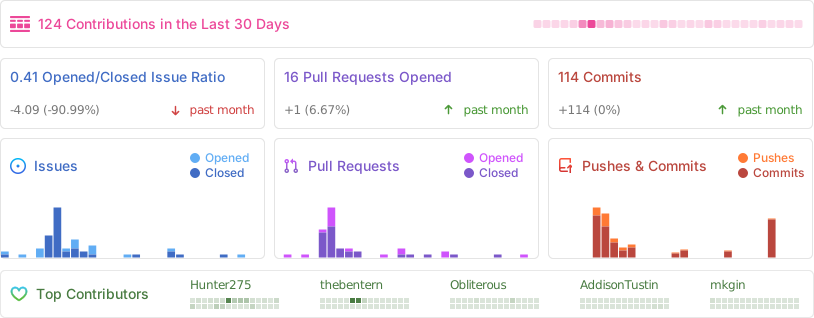 |
GPL-3.0-only. See LICENSE.